In order to send coin/tokens(i.g. FNCY, CUBE, BNB, ETH, etc) on the FNCY Wallet to another wallet or an exchange, the respective wallet address is needed. When transferring, network fee (FNCY, BNB, ETH) will incur.
Network fees are fees paid for verification on the blockchain network that are required for transactions (transaction execution and contract operation). The fee may vary depending on the network status.
Be sure to have BNB in your wallet before making a transaction.
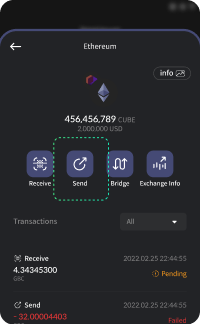
To send tokens, [Send Button > Enter Address > Enter Amount > Wallet Password Confirmation]. Please refer to the information below for further details.
- Send Button
You can send tokens using the Send button at the bottom of token in the wallet menu.
- Enter Address
Enter the wallet address based on same network of the token recipient.
All transfers are recorded on the blockchain network and cannot be changed/cancelled.
Therefore, coins/token sent to other networks such as BEP-2 or the wrong address cannot be returned, so be sure to double check the address before sending.
- Enter Token Amount
Enter the token amount you would like to send, or calculate an approximate amount based on the current market price.
The market price continuously changes based on CoinMarketCap, and thus, the amount is an approximate.
- Enter Wallet Password
Enter the wallet password you created.
Apart from the FNCY login password, this password is used to view your assets, as well as token and NFT transfers.
- Check Transfer
To view your deposit/withdrawal history, select the transferred token in your wallet.